Create your first app
Prerequisites
We hope you have already set up the development environment. If not, please refer to the Appshare Development Environment guide.
You should see the first app in the local/src/apps/
Index file
The entry point of the app is the index.js file. This file is located in the local/src/apps/yourAppName.
In the first app we will access the Address Book.
In side useEffect we are calling the loadAddresses function to fetch the data from the AIS server. The getAddresses function is defined in the api.js file.
import React, { useEffect, useState } from "react";
import { getAddresses } from "./api";
import {
  Box,
  Typography,
  Paper,
  Grid,
  Avatar,
  InputAdornment,
  Stack,
} from "@mui/material";
import {
  filterData,
  setProcessingCircle,
  setStackErrorMessage,
} from "@appshare/core";
import SearchIcon from "@mui/icons-material/Search";
import LocalPhoneOutlinedIcon from "@mui/icons-material/LocalPhoneOutlined";
import TextField from "@appshare/ui/src/Inputs/TextField";
import { useTheme } from "@mui/styles";

// Component to display phone number with an icon
function Phone({ phone }) {
  return (
    <Stack direction={"row"} spacing={1} alignItems={"center"}>
      <LocalPhoneOutlinedIcon fontSize="small" />
      <Typography variant="caption" color={"textSecondary"}>
        {phone}
      </Typography>
    </Stack>
  );
}

// Function to generate a color based on a string and address
function stringToColor(string, address) {
  let hash = 0;
  let i;
  for (i = 0; i < string.length; i += 1) {
    hash = string.charCodeAt(i) + ((hash << 5) - hash + address);
  }
  let color = "#";
  for (i = 0; i < 3; i += 1) {
    const value = (hash >> (i * 8)) & 0xff;
    color += `00${value.toString(16)}`.slice(-2);
  }
  return color;
}

// Function to get initials from a name
function getInitials(name) {
  return name
    .split(" ")
    .filter((word) => word.length > 2)
    .slice(0, 2)
    .map((word) => word[0])
    .join("");
}

// Main component
export default function Index() {
  const theme = useTheme();
  const [addresses, setAddresses] = useState([]);
  const [searchTerm, setSearchTerm] = useState("");

  useEffect(() => {
    loadAddresses();
  }, []);

  // Function to load addresses from the API
  async function loadAddresses() {
    try {
      setProcessingCircle(true);
      const addresses = await getAddresses();
      setAddresses(addresses);
    } catch (error) {
      setStackErrorMessage(error);
    } finally {
      setProcessingCircle(false);
    }
  }

  const filteredAddresses = filterData(searchTerm, addresses);

  return (
    <Box sx={{ padding: 1 }}>
      <Box sx={{ position: "sticky", top: 0, zIndex: 1 }}>
        <TextField
          variant="paper"
          fullWidth
          margin="normal"
          placeholder="Search"
          value={searchTerm}
          InputProps={{
            startAdornment: (
              <InputAdornment position="start">
                <SearchIcon />
              </InputAdornment>
            ),
          }}
          onChange={(e) => setSearchTerm(e.target.value)}
        />
      </Box>
      <Grid container spacing={1}>
        {filteredAddresses.map((line) => (
          <Grid item xs={12} sm={6} md={4} xl={2} key={line.address}>
            <Paper
              elevation={3}
              sx={{ padding: 2, display: "flex", alignItems: "center" }}
            >
              <Avatar
                sx={{
                  marginRight: 2,
                  bgcolor: stringToColor(line.alphaName, line.address),
                  color: theme.palette.getContrastText(
                    stringToColor(line.alphaName, line.address)
                  ),
                }}
              >
                {getInitials(line.alphaName)}
              </Avatar>
              <Box
                display={"flex"}
                flexDirection={"column"}
                sx={{
                  overflow: "hidden",
                }}
              >
                <Typography variant="body1" noWrap>
                  {line.alphaName}
                </Typography>
                <Typography variant="caption" color={"textSecondary"}>
                  {line.address}
                </Typography>
                <Phone phone={line.phone} />
              </Box>
            </Paper>
          </Grid>
        ))}
      </Grid>
    </Box>
  );
}
API (api.js)
in the api.js file, we will fetch the data from the AIS server
import { getParameterValue } from "@appshare/core";
import { jdedwards } from "@appshare/jde-api";

export async function getAddresses() {
  const { data, error } = await jdedwards()
    .form("W01012B") // Address Book P01012
    .maxPageSize(500)
    .actions()
    .value("58", getParameterValue("SEARCH_TYPE", "E")) // SEARCH_TYPE variable is coming from the manifest file
    .doFind("15") // click on the find button
    .executeToList({
      alphaName: "20",
      address: "19",
    });

  if (error) {
    return error;
  }
  if (data.length > 0) {
    const phoneNumbers = await getPhoneNumberOfAddress(
      data.map((address) => address.address)
    );
    if (phoneNumbers.length > 0) {
      data.forEach((address) => {
        const phone = phoneNumbers.find(
          (phone) => phone.address === address.address
        );
        if (phone) {
          address.phone = `${phone.phonePrefix} ${phone.phoneNumber}`;
        }
      });
    }
    return data;
  }
  return [];
}

export async function getPhoneNumberOfAddress(addresses) {
  const { data, error } = await jdedwards()
    .data("F0115")
    .query()
    .list("AN8", addresses) // list of address numbers
    .executeToList({
      phonePrefix: "AR1", // alias for phone prefix
      phoneNumber: "PH1", // alias for phone number
      address: "AN8", // alias for address number
    });

  if (error) {
    return error;
  }
  return data;
}
These files work together to fetch and display address data in the app. The index.js file handles the UI and user interactions, while the api.js file handles data fetching from the AIS server.
App UI
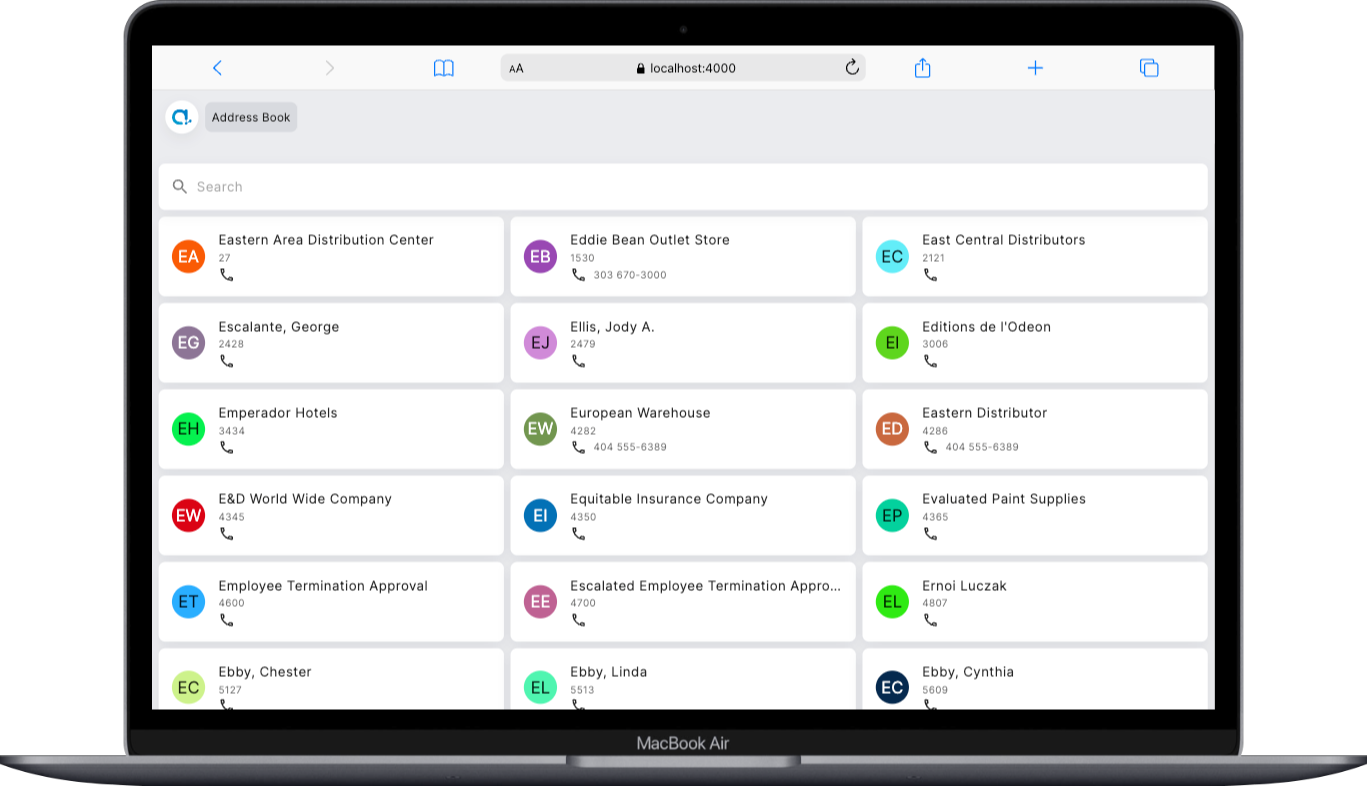
If you have everything working, you should see the following output: